
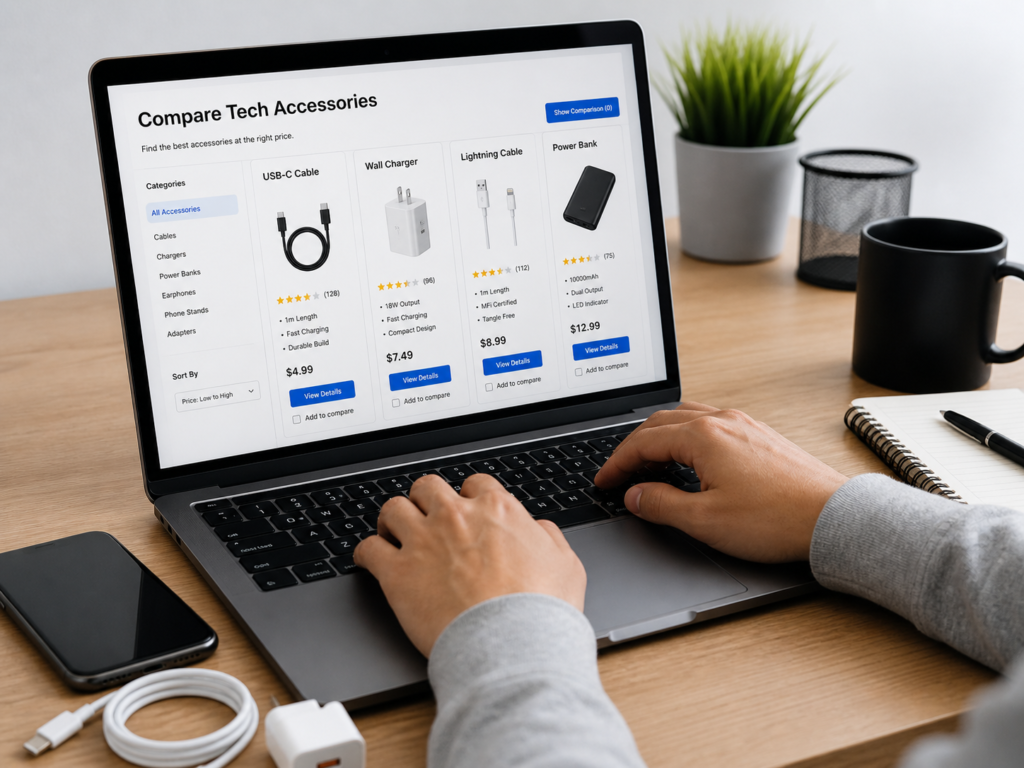
Cheap tech accessories can save money — or waste it.
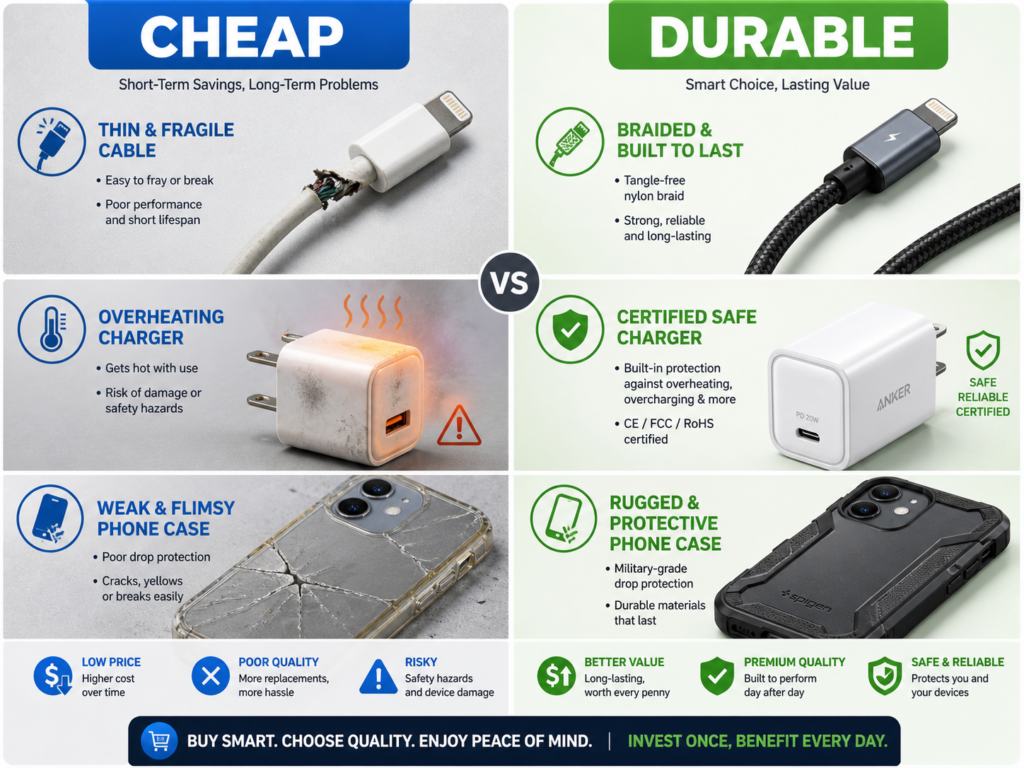
A $6 cable that stops working after 3 weeks is not a bargain. A $15 charger that overheats is not worth the risk. A $10 phone case that cracks after one drop may cost more in the long run if your screen breaks.
The smart way to buy budget tech accessories is to look for value, not just the lowest price. Good budget accessories should be safe, compatible, durable, well-reviewed, and backed by a clear return or warranty policy.
What Are Budget Tech Accessories?
Budget tech accessories are affordable add-ons that improve, protect, charge, connect, or organise your devices without premium pricing.
Examples include:
- Charging cables
- Wall chargers
- Power banks
- Phone cases
- Screen protectors
- Laptop stands
- USB-C hubs
- Keyboards and mice
- Cable organisers
- Webcam covers
- Earbuds
- Tablet cases
A budget accessory is not automatically low quality. Many affordable accessories from reputable brands can last 1–3 years or longer if chosen carefully.
Why Cheap Tech Accessories Often Fail
Cheap accessories often fail because they cut corners on materials, testing, connectors, safety parts, or build quality.
Common problems include:
- Cables fraying near the connector
- Chargers overheating
- Power banks losing capacity quickly
- USB-C hubs disconnecting randomly
- Phone cases becoming loose
- Screen protectors cracking easily
- Cheap stands wobbling under laptop weight
- Poor product descriptions hiding limitations
Electrical Safety First notes that certified USB devices are generally very safe when used correctly and according to manufacturer instructions. That matters because uncertified or counterfeit charging products can create avoidable safety risks. (Electrical Safety First)
How to Choose Budget Tech Accessories That Actually Last
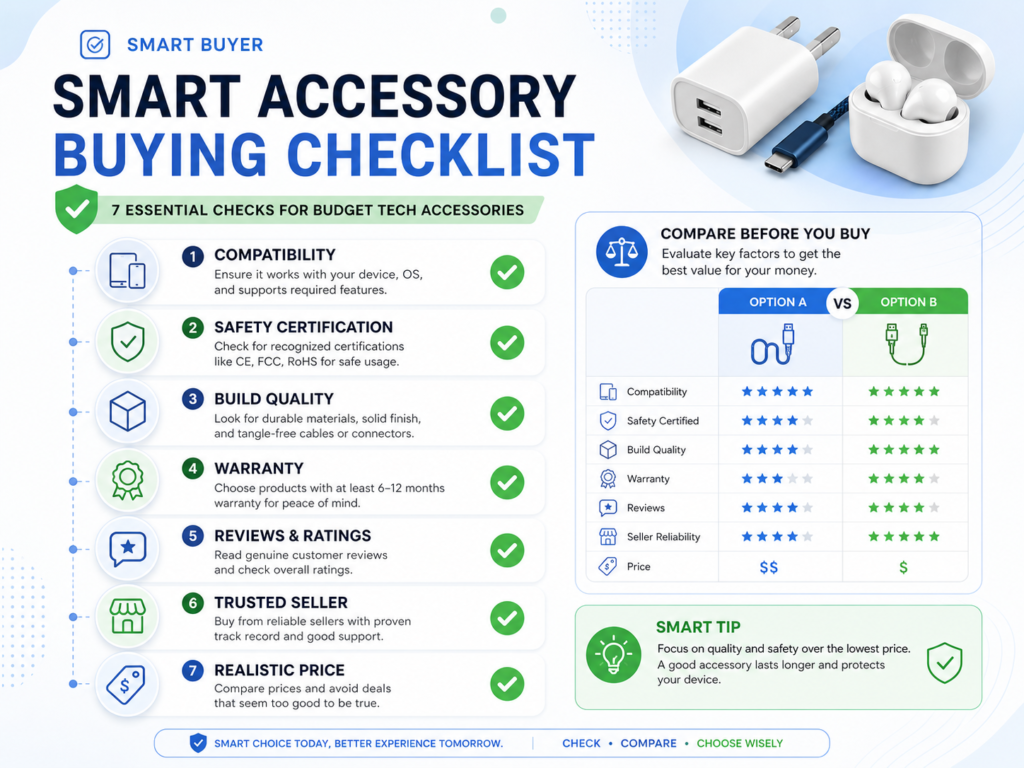
To choose budget tech accessories that last, check compatibility, safety certification, build quality, warranty, reviews, and total value before buying. Avoid unknown sellers, unclear specifications, unrealistic claims, and accessories that are far cheaper than similar products.
Use this quick buying checklist:
- Check your device model and port type
- Match the correct wattage or standard
- Choose known accessory brands
- Look for safety certifications
- Read recent reviews carefully
- Check return and warranty policies
- Avoid suspiciously cheap listings
- Buy from trusted retailers
The goal is not to buy the most expensive accessory. The goal is to avoid buying twice.
1. Check Compatibility First
Compatibility is the first rule of smart buying.
Before buying any accessory, check:
- Device model
- Port type
- Charging wattage
- Cable speed
- Case size
- Operating system support
- Power delivery requirements
- Connector type
Example:
A USB-C cable may charge your phone, but it may not support fast charging, video output, or high-speed data transfer. USB-IF explains that not all USB cables have the same capabilities, and users need to choose certified cables with the right capabilities for their environment. (USB-IF)
A simple scenario:
If your laptop charges at 65W, buy a USB-C cable and charger rated for at least 65W. A 100W cable is fine, but a low-quality 30W cable may charge slowly or fail under regular use.
2. Avoid the Cheapest Charger You Can Find
Chargers are not the place to take unnecessary risks.
A good budget charger should have:
- Clear wattage rating
- Reputable brand name
- Safety markings
- Good reviews
- Overheating protection
- Correct plug type
- Warranty support
For everyday phone charging, a reliable charger often costs around $12–$30. For laptop charging, expect around $30–$70, depending on wattage and ports.
Do not buy a charger just because it is $5–$8 cheaper. If it damages a $500–$1,000 phone or laptop, the saving disappears instantly.
3. Choose Cables Based on Use, Not Just Length
A cable should match how you actually use it.
For charging at a desk, a 1–2 metre cable is usually practical. For travel, a shorter 0.3–1 metre cable may be easier to pack. For fast laptop charging, check wattage support. For external monitors or fast file transfers, check data speed and video support.
Look for:
- Reinforced connector ends
- Braided or thick outer jacket
- USB-IF certification where relevant
- Clear wattage rating, such as 60W, 100W, or 240W
- Data speed if needed, such as USB 3.2 or USB4
- Warranty or replacement policy
USB-IF’s product search is limited to products certified to bear the USB-IF logo and that have passed the USB-IF compliance programme, which can help buyers verify certified products. (USB-IF)
Budget cable range:
- Basic phone charging cable: $8–$18
- Durable braided cable: $10–$25
- Laptop USB-C charging cable: $15–$35
- High-speed data/video cable: $20–$50
4. Read Reviews the Smart Way
Reviews can help, but only if you read them properly.
Do not rely only on star ratings. A product with 4.6 stars may still have repeated complaints about the same issue.
Look for patterns such as:
- “Stopped working after 2 months”
- “Gets hot”
- “Loose connector”
- “Does not fast charge”
- “Does not fit properly”
- “Poor customer service”
- “Replacement worked well”
The FTC recommends reading online reviews from people who bought the item or from product experts, and checking feedback about how well the product works and its overall quality. (Consumer Advice)
A practical rule: read at least 10–20 recent reviews, including 1-star, 2-star, and 3-star reviews. Those often reveal long-term problems better than glowing reviews.
5. Check the Warranty Before Buying
A warranty is not exciting, but it can save money.
The FTC explains that a warranty is a manufacturer’s promise to stand behind a product, and buyers should read what is covered, how long coverage lasts, and what is excluded. (Consumer Advice)
For budget tech accessories, aim for:
- Cables: 12–24 months
- Chargers: 12–24 months
- Power banks: 12–24 months
- Phone cases: 6–24 months
- Keyboards and mice: 12–36 months
- Laptop stands: 12 months or longer
Example:
A $15 cable with a 24-month warranty may be better value than a $9 cable with no warranty. If the cheaper cable fails twice, you may spend $18–$27 and still waste time replacing it.
6. Buy From Trusted Retailers
Where you buy matters.
Trusted retailers usually offer clearer returns, better customer service, and less risk of counterfeit accessories.
Safer buying options include:
- Official brand websites
- Major electronics retailers
- Reputable online marketplaces
- Authorised resellers
- Well-known department stores
Be cautious with:
- Unknown sellers
- Listings with copied images
- No product specifications
- No warranty details
- Prices far below normal
- Brand names spelt strangely
- No seller contact information
The FTC advises shoppers to compare products, check sellers, review return and refund policies, pay safely where possible, and keep purchase records such as receipts and emails. (Consumer Advice)
7. Know Which Accessories Are Worth Paying More For
Some accessories affect safety and device lifespan more than others. These are worth spending slightly more on.
Spend more carefully on:
- Chargers
- Power banks
- USB-C hubs
- Laptop docks
- Cables used for high power
- Screen protectors for expensive phones
- Phone cases for fragile devices
- External storage drives
You can spend less on:
- Cable ties
- Laptop sleeves
- Basic stands
- Desk mats
- Simple phone grips
- Cleaning cloths
- Basic stylus holders
Example:
A $25–$40 charger from a reputable brand is usually a smarter buy than a no-name $10 charger. But a $6–$12 cable organiser may be perfectly fine if it is only holding wires on a desk.
8. Match Accessories to Your Actual Lifestyle
The best accessory is the one that survives your routine.
If you travel often, buy accessories that are compact, durable, and easy to pack. If you work at a desk, choose stronger cables, a stable stand, and a reliable hub. If you use your phone outdoors, prioritise a protective case and screen protector.
Simple examples:
- Student: durable cable, laptop sleeve, budget earbuds
- Remote worker: laptop stand, keyboard, USB-C hub
- Traveller: power bank, compact charger, cable pouch
- Parent: strong phone case, screen protector, spare charger
- Gamer: cooling stand, reliable controller cable, headset stand
Spending $50–$100 on the right accessories may protect a $700–$1,500 device and improve daily use.
9. Use Real Brands Without Overpaying
You do not need luxury accessories. But buying from known accessory brands often improves reliability.
Global
- Anker — reliable chargers, cables, power banks
- UGREEN — good-value hubs, cables, adapters
- Belkin — trusted charging and Apple accessories
United States
- Amazon Basics — affordable simple everyday accessories
- Monoprice — budget cables and adapters
- Satechi — clean desktop and USB-C accessories
United Kingdom / Europe
- Belkin — widely available charging accessories
- UGREEN — strong value for USB-C accessories
- Native Union — durable premium-style accessories
Advanced users
- CalDigit — higher-end docks for heavy workflows
- Cable Matters — practical cables and adapters
- Plugable — reliable hubs and docking stations
UGREEN’s warranty process, for example, asks for proof of purchase and defect details, showing why keeping receipts matters if an accessory fails. (UGREEN UK)
10. Calculate Cost Per Month
The cheapest product is not always the best value.
Use this simple formula:
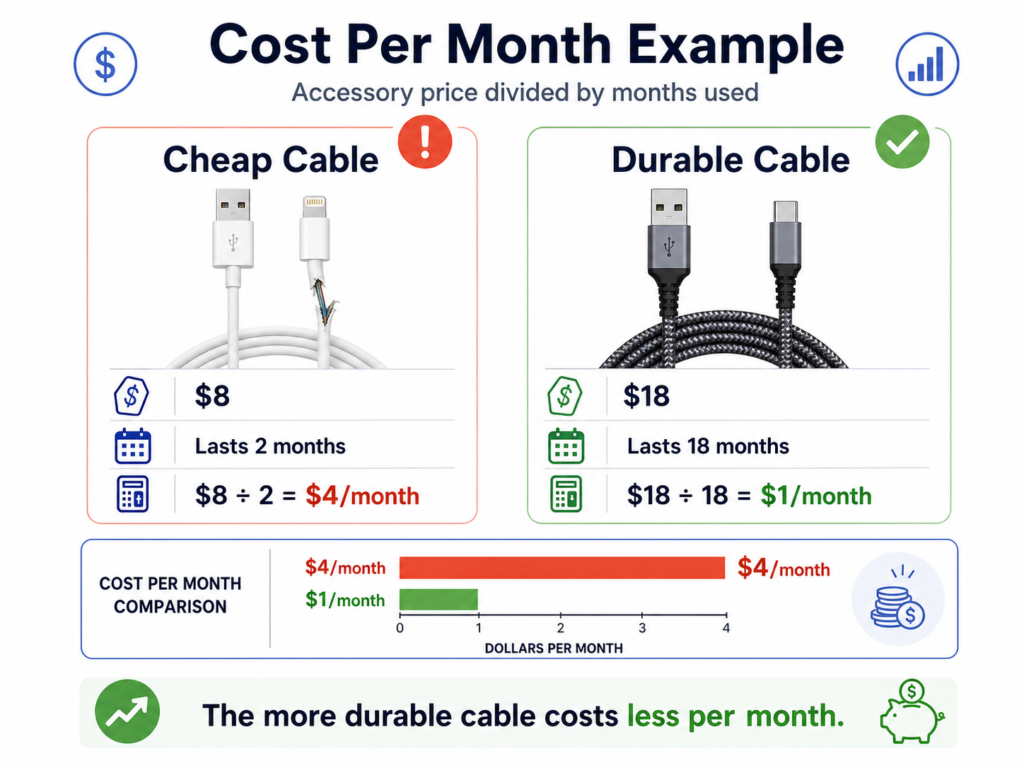
Cost per month = product price ÷ months used
Example:
- Cable A: $8, lasts 2 months = $4 per month
- Cable B: $18, lasts 18 months = $1 per month
- Charger A: $12, lasts 6 months = $2 per month
- Charger B: $35, lasts 36 months = $0.97 per month
A more durable accessory can be cheaper over time.
This is especially important for items you use daily, such as chargers, cables, cases, keyboard, mouse, and laptop stands.
Common Budget Tech Accessory Mistakes
Avoid these mistakes:
- Buying only by lowest price
- Ignoring wattage and compatibility
- Choosing no-name chargers
- Buying from unclear sellers
- Ignoring warranty length
- Trusting star ratings without reading reviews
- Buying accessories you do not need
- Choosing style over protection
- Using damaged cables for too long
- Keeping overheating chargers in use
A simple rule: if an accessory charges, powers, stores data, or connects expensive devices, choose quality over the absolute lowest price.
Budget Buying Checklist
Before clicking “buy”, check:
- Does it fit my exact device?
- Does it support the power or speed I need?
- Is the brand or seller trustworthy?
- Are the reviews recent and consistent?
- Does it have a clear return policy?
- Is there at least a 12-month warranty?
- Are there safety certifications where relevant?
- Is the price realistic, not suspiciously cheap?
- Will I actually use it weekly?
- Does it protect or improve a device I already own?
If the answer is no to several of these, skip it.
FAQ
Are budget tech accessories worth buying?
Yes, budget tech accessories can be worth buying if they are compatible, safe, durable, well-reviewed, and backed by a clear warranty. Avoid unknown chargers, vague listings, and products with repeated failure complaints.
What tech accessories should I not buy too cheap?
Avoid ultra-cheap chargers, power banks, high-power USB-C cables, laptop docks, and external storage. These accessories affect safety, charging, data transfer, and expensive devices.
How much should I spend on a good charging cable?
A reliable charging cable usually costs around $8–$25. For laptop charging, fast data transfer, or video output, expect around $15–$50, depending on wattage, speed, certification, and build quality.
How do I know if a tech accessory will last?
Check the brand reputation, warranty length, connector build, materials, recent reviews, return policy, and whether the product clearly lists specifications. Repeated complaints about overheating, loose ports, or early failure are warning signs.
Is it better to buy official accessories?
Official accessories can be reliable but are not always necessary. Reputable third-party brands can offer better value if they meet safety standards, match your device specifications, and have strong reviews and warranty support.
Conclusion
Choosing budget tech accessories that actually last is about smart value, not the lowest price.
Check compatibility first, avoid suspiciously cheap chargers, choose cables based on power and data needs, read reviews carefully, and buy from trusted retailers. For accessories that charge, power, connect, or protect expensive devices, spending $10–$30 more can save money over time.
The best budget accessory is affordable, safe, durable, and useful in your real daily routine.
CTA: Before buying your next tech accessory, compare at least 3 options by compatibility, warranty, reviews, and cost per month. That simple habit can help you avoid cheap products that fail fast.