Buying a laptop shouldn’t feel confusing or expensive—but for many people, it does. With so many options, it’s easy to overspend on features you don’t need.
The good news? You can choose the right laptop for your needs and save $200–$800 by making smarter decisions. This guide breaks everything down in simple terms.
What Does It Mean to Choose the Right Laptop?
Choosing the right laptop means selecting a device that matches your actual usage, not the most powerful or expensive option.
Instead of buying the “best” laptop, you focus on:
- Your daily tasks
- Your budget
- Long-term usability
Example:
A student who only browses, streams, and writes documents doesn’t need a $1,500 laptop—$500–$800 is often enough.
Why Most People Overspend on Laptops
Many buyers fall into common traps:
- Buying unnecessary high specs
- Choosing brand over value
- Ignoring real usage needs
- Falling for marketing terms
Scenario:
Paying $1,200 for a high-end laptop when a $700 model performs the same for your tasks = $500 wasted.
How to Choose the Right Laptop (Step-by-Step)
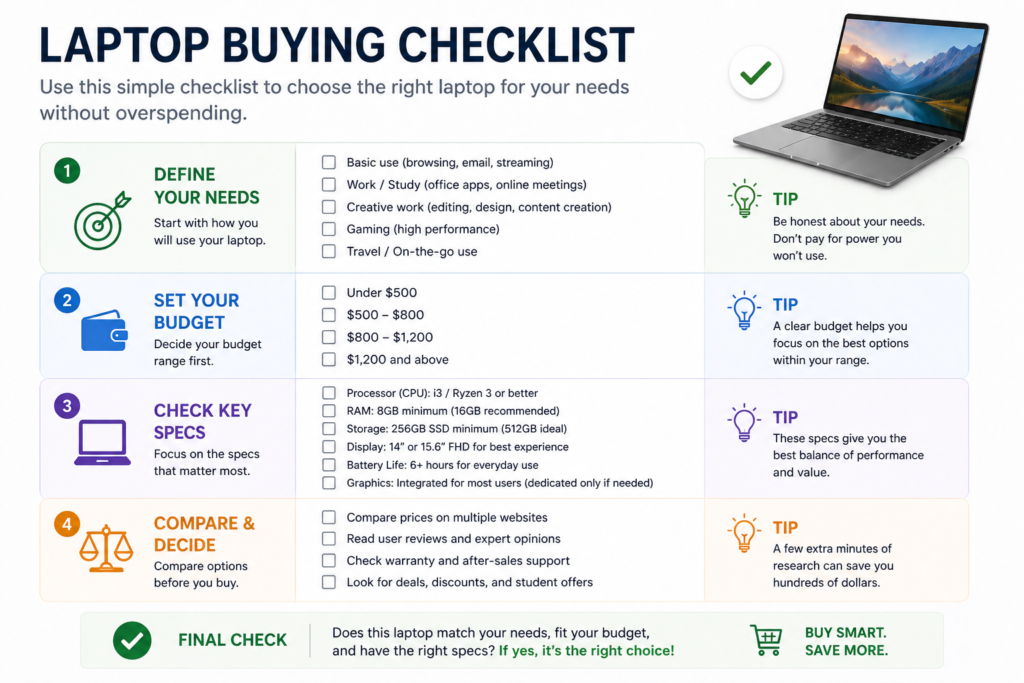
1. Identify Your Main Use
Start with what you actually do daily.
Common categories:
- Basic use → browsing, emails, Netflix
- Work/study → documents, spreadsheets, meetings
- Creative → video editing, design
- Gaming → high-performance graphics
Example:
If you mainly use Google Docs and browse the web, you don’t need high-end specs.
2. Choose the Right Performance (CPU & RAM)
This is where most overspending happens.
Simple guideline:
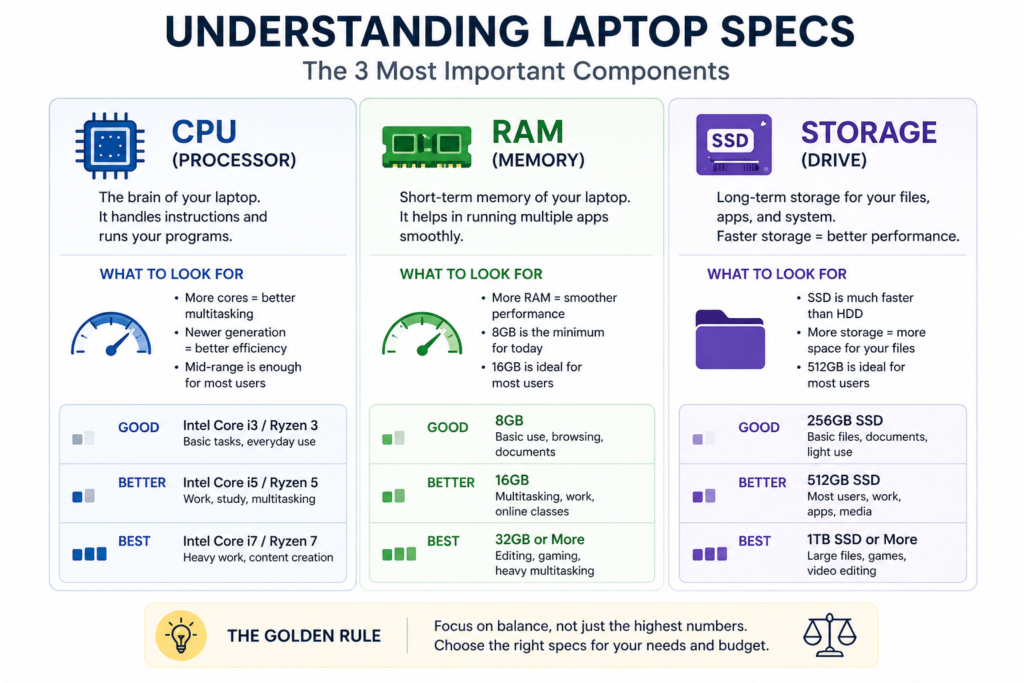
- 8GB RAM → basic use (smooth performance)
- 16GB RAM → multitasking, work, light editing
- 32GB+ → advanced users only
Processor (CPU):
- Mid-range CPUs handle 90% of users
Example:
A laptop with 16GB RAM instead of 8GB may cost $100–$200 more, but improves longevity by 2–3 years.
3. Pick the Right Storage (SSD vs HDD)
Always choose SSD (Solid State Drive).
Why SSD matters:
- Faster boot times
- Faster file access
- Better overall performance
Recommended:
- 256GB → minimum
- 512GB → ideal
Scenario:
Upgrading from HDD to SSD can make a laptop feel 2–5x faster.
4. Don’t Overpay for Graphics
Graphics cards (GPU) are only needed for:
- Gaming
- Video editing
- 3D design
Avoid paying extra if you don’t need it.
Example:
Skipping a dedicated GPU can save $200–$500.
5. Focus on Battery Life and Portability
If you move around often, this matters more than power.
What to look for:
- 8–12 hours battery life
- Lightweight design (under 1.5kg)
Scenario:
A lighter laptop improves daily convenience without affecting performance.
6. Choose the Right Screen Size
Screen size affects comfort and portability.
Options:
- 13–14 inch → portable, ideal for travel
- 15–16 inch → better for work and multitasking
Example:
A 14-inch laptop balances portability and usability for most people.
7. Compare Before You Buy
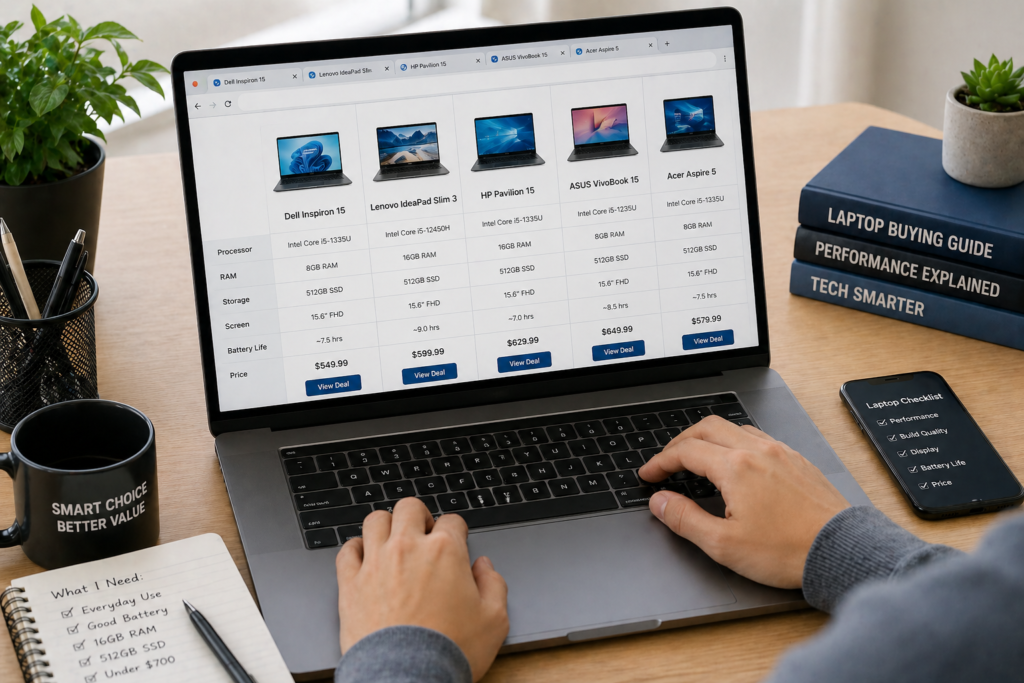
Never buy the first option you see.
Use tools like:
- Amazon
- PriceRunner
Scenario:
Comparing prices can save 10–25% ($100–$300).
Real Laptop Examples (By Use Case)
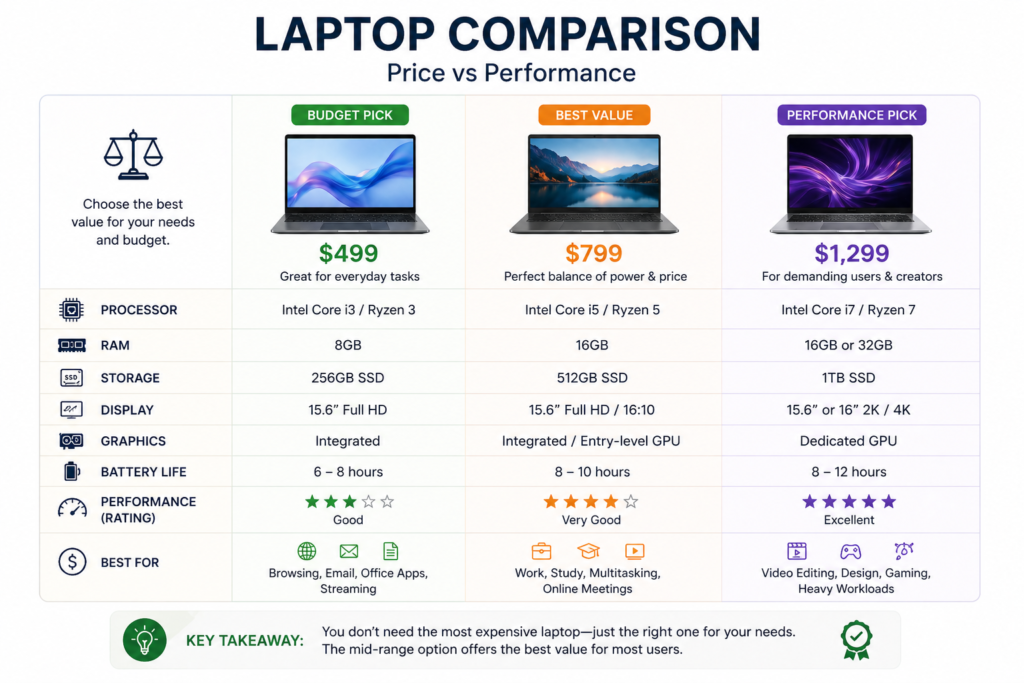
Basic Use ($400–$700)
- Web browsing
- Streaming
- Office tasks
Example:
Chromebooks or entry-level Windows laptops
Work & Study ($700–$1,000)
- Multitasking
- Video calls
- Office software
Example:
Mid-range laptops with 16GB RAM
Creative & Advanced ($1,000–$2,000)
- Video editing
- Design work
Example:
High-performance laptops with strong CPUs and GPUs
Best Tools to Help You Choose the Right Laptop
🌍 Global
- Amazon – wide selection and reviews
- PriceRunner – find best deals
- YouTube – real-world laptop reviews
🇺🇸 United States
- Best Buy – in-store testing options
- Newegg – competitive pricing
🇬🇧 UK / Europe
- Currys – wide laptop selection
- Argos – budget-friendly options
⚙️ Advanced Users
- PassMark – compare performance
- CPU-Z – check hardware details
Common Laptop Buying Mistakes
- Buying more power than needed
- Ignoring battery life
- Choosing HDD instead of SSD
- Not comparing prices
- Overpaying for brand name
Avoiding these can save $200–$800 easily.
FAQ
How much should I spend on a laptop?
Most people should spend $500–$1,000, depending on their needs.
Is 8GB RAM enough?
Yes for basic use, but 16GB is better for long-term performance.
Should I buy a laptop with SSD?
Yes. SSD improves speed significantly and is essential.
How long should a laptop last?
A good laptop lasts 3–5 years with proper care.
Is it worth buying a premium laptop?
Only if you need advanced features. Otherwise, mid-range offers better value.
Conclusion
Choosing the right laptop isn’t about buying the most expensive model—it’s about buying what fits your needs.
By focusing on performance, avoiding unnecessary features, and comparing options, you can save $200–$800 while still getting a powerful, reliable device.
Start with your needs, not the price tag—and you’ll make a smarter decision.