

A writer reviewing an AI-assisted draft and preparing to edit it into a natural human piece. The screen is an illustrative mock writing interface, not a real app screenshot.
AI writing tools can save hours, but they can also make your work sound flat, generic and strangely polished. That is why learning how to use AI writing tools properly matters.
The aim is not to let software replace your voice. The aim is to use AI for speed, structure and ideas, then add human judgement, examples and rhythm before you publish.
In this guide, you will learn a simple system for using AI writing tools without sounding robotic. You will also see real tool examples, editing steps and practical prompts you can use today.
What Makes AI Writing Sound Robotic?
AI writing sounds robotic when it is too smooth, too vague or too predictable. The sentences may be grammatically correct, but they often lack personal experience, contrast, humour, detail and natural rhythm.
For example, a robotic sentence might say: ‘This innovative solution improves productivity.’ A more human version would say: ‘This saves time because you stop staring at a blank page and start editing a real draft.’
Common signs of robotic AI writing include repetitive phrases, overused words, perfect structure with no personality, weak examples and claims that feel too general. Therefore, your first job is to spot bland writing before readers do.
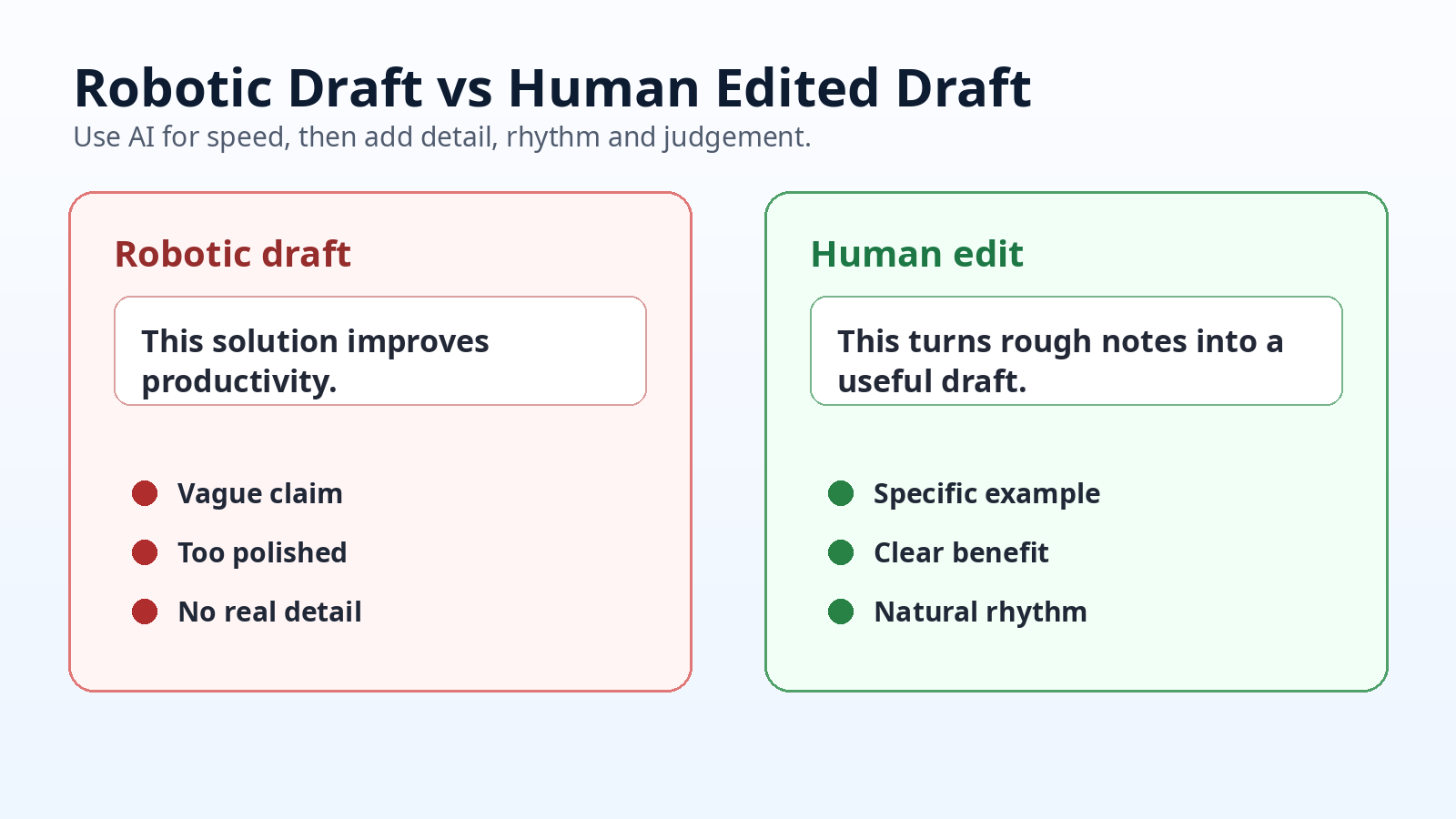
A clean comparison showing how a vague AI draft becomes clearer after human editing.
How to Give AI Better Instructions First
Better AI writing starts before the first draft. If your prompt is vague, the result will usually be vague too. A strong prompt gives the tool a reader, goal, tone and example.
Use this simple formula: tell the tool who the content is for, what the content should help them do, what tone you want, what to avoid and what example style it should follow.
For example, instead of asking ChatGPT to ‘write a blog intro’, ask it to ‘write a friendly 120-word blog intro for beginners who feel overwhelmed by AI writing tools. Avoid hype, use British English and include one practical promise.’
This usually cuts editing time by 20-30% because the draft begins closer to your target. However, it still needs human editing before publication.
Read also: How to Use AI Tools to Boost Daily Productivity Fast
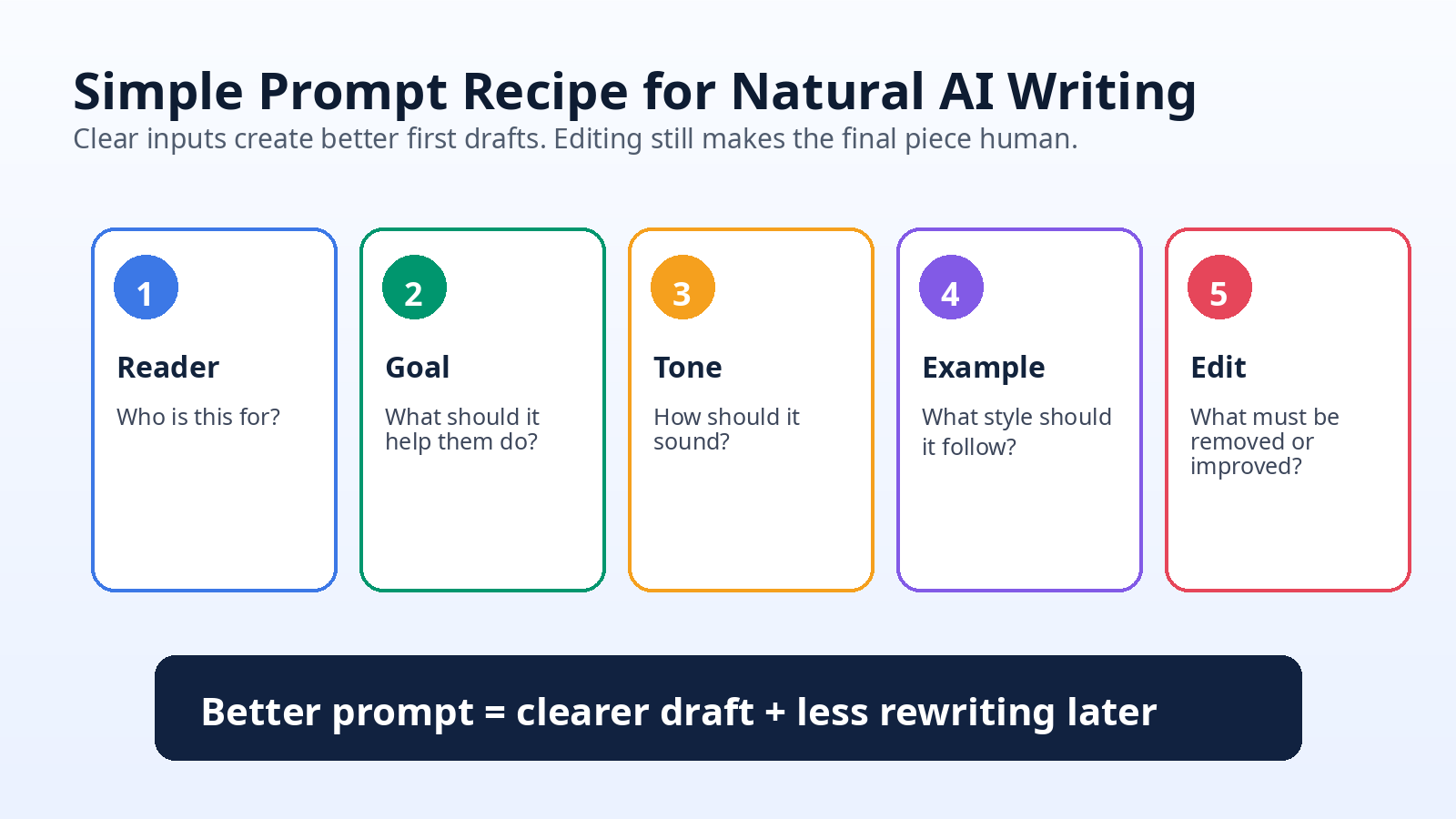
A visual prompt recipe showing the five inputs that help AI produce more natural first drafts.
Edit the Draft Like a Human, Not a Proofreader
Proofreading only fixes grammar. Human editing fixes meaning. After AI creates a draft, read it as if you were the audience. Ask whether the advice feels useful, specific and believable.
Start with three passes. First, delete empty claims. Second, add real examples. Third, change sentences that sound too formal. This 20-30 minute process can turn a bland draft into publishable content.
For example, if an AI tool writes ‘businesses can benefit from improved efficiency’, replace it with a concrete line: ‘A freelancer can turn 10 rough notes into a client email in 15 minutes instead of starting from zero.’
In addition, keep some natural variation. Short sentences help. Questions help too. Meanwhile, one longer sentence can add flow when the idea needs more context.
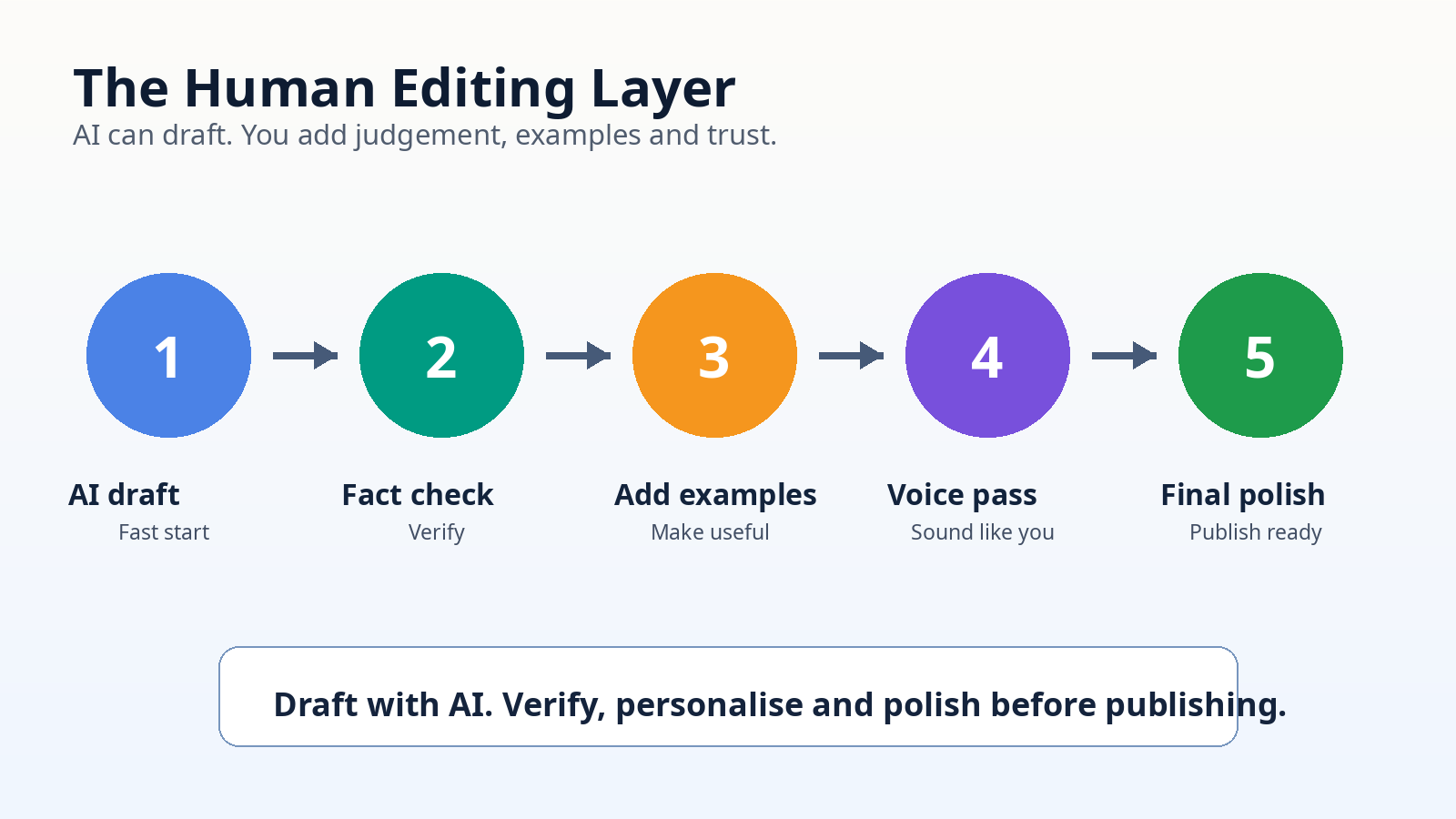
The human editing layer: draft with AI, then verify, personalise and polish before publishing.
Use Real Tools for Different Writing Jobs
Not every AI writing tool is best for every task. Some are strong for drafting. Others are better for grammar, tone, planning or editing. A useful workflow combines 2-3 tools rather than jumping between ten apps.
Global: ChatGPT is useful for brainstorming, outlines and rewriting. Grammarly helps with grammar, clarity and tone. Notion AI works well if your notes, tasks and drafts already live inside Notion.
United States: Google Docs is useful for writing inside shared documents. Jasper is popular for marketing workflows. Canva Magic Write can help with short social captions and design-related copy.
United Kingdom / Europe: DeepL Write is helpful for clearer multilingual editing. LanguageTool checks grammar across several languages. Microsoft Copilot can support users already working inside Word and Microsoft 365.
Advanced users: Claude can help with long-form drafts, Perplexity can support research workflows, and Zapier AI can help connect content tasks with automation. Paid tools often cost around $10-$30 monthly, so choose based on time saved, not hype.
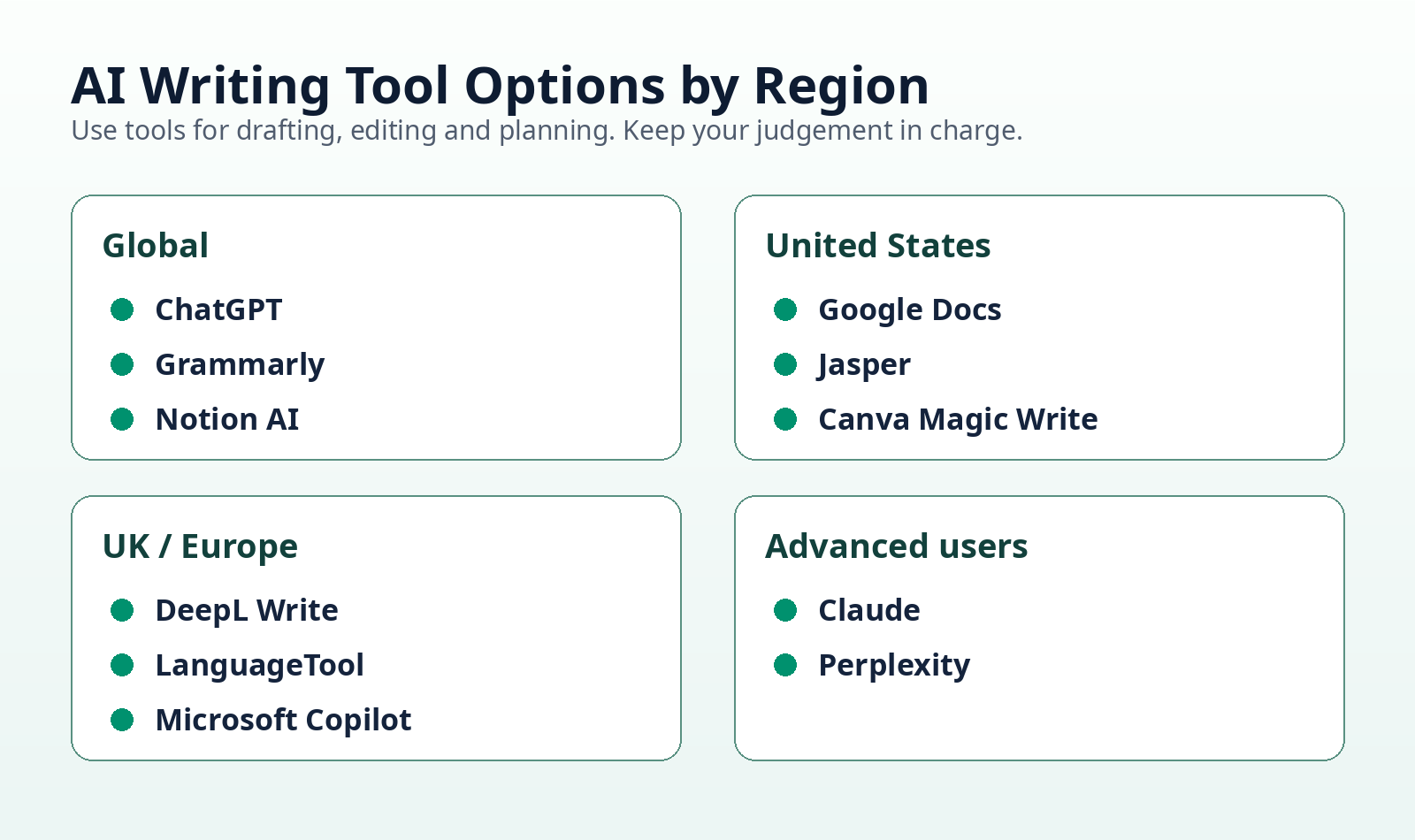
An educational tool map showing well-known AI writing options by region and use case.
Keep Your Own Voice in the Final Version
Your voice is the part AI cannot fully copy. It comes from your examples, opinions, word choices and lived experience. Therefore, add one personal angle to every important section.
A simple method is the ‘one human detail’ rule. For every 150-200 words of AI-assisted text, add a detail only a real person would know. This might be a small frustration, a practical warning or a simple story.
For example, if you are writing about productivity, mention the exact moment the advice helps: after a meeting, before sending a client email or when turning messy notes into a clean outline.
On the other hand, do not over-personalise. The reader still wants the answer. Your voice should make the advice easier to trust, not distract from the point.
Also read: 10 Best Free AI Tools for Automating Everyday Tasks Effortlessly
Check Facts, Claims and Tone Before Publishing
AI tools can produce confident mistakes. Because of this, never publish factual claims, prices, statistics or legal/medical/financial advice without checking reliable sources.
Create a final checklist before pressing publish. Check names, dates, prices, tool features, links, quotes and examples. If the article mentions a product plan or feature, verify it on the official website.
Tone also matters. Remove exaggerated phrases such as ‘revolutionary’, ‘game-changing’ and ‘ultimate solution’ unless they are truly justified. Readers trust clear writing more than hype.
A practical rule is to spend 10-20% of your total writing time on final verification. So if a blog post takes two hours, use 12-24 minutes for fact-checking and polishing.
How to Build a Simple AI Writing Workflow
A simple workflow prevents AI from taking over the whole piece. Use AI for the first 40-60% of the process, then use your own judgement for the rest.
Try this structure: research the topic, create an outline, ask AI for a rough draft, rewrite weak sections, add examples, check facts, improve rhythm and then publish. This keeps the process fast without making the result feel machine-made.
For example, a blogger could use ChatGPT for an outline, Notion for notes, Grammarly for clarity and WordPress for publishing. Similarly, a small business owner could use Google Docs, Grammarly and Canva for newsletters and social posts.
The key is control. AI should reduce blank-page pressure. It should not decide your message, your examples or your final judgement.
FAQ
How do I make AI writing sound more human?
Add specific examples, vary sentence length, remove vague phrases and include your own judgement. AI can draft, but you should shape the final voice.
Can Google detect AI writing?
Search engines focus on helpful, original content. However, thin AI content with no value, poor accuracy or weak experience can perform badly.
What is the best AI writing tool for beginners?
ChatGPT, Grammarly and Notion AI are beginner-friendly options. Choose one drafting tool and one editing tool before adding more.
Should I use AI for blog posts?
Yes, if you use it responsibly. Use AI for outlines, ideas and rough drafts, then edit for accuracy, examples and natural tone.
How much should I edit AI-generated content?
Edit at least 30-50% of the draft if it sounds generic. Rewrite weak sections, check facts and add useful details before publishing.
Conclusion: Use AI for Speed, Then Add Human Value
AI writing tools are useful when they help you move faster without removing your voice. The strongest results come from a simple process: prompt clearly, draft quickly, edit deeply and verify carefully.
Do not aim for perfect AI text. Aim for a useful first draft that you can improve. Add examples, remove robotic wording and write for the reader in front of you.
Start with one article, email or social post this week. Use AI to get moving, then make the final version sound like a real person with something useful to say.